Hotel Room Hidden Camera Check: 5-Minute Sweep Guide

Disclosure: This page contains affiliate links. We may earn a commission at no extra cost to you. We research products from manufacturer specifications and published reviews; we do not test them ourselves. Full disclosure.
Key Takeaways
- A basic hidden camera sweep takes 5 minutes with just your phone.
- The fingertip gap test cannot reliably identify a two-way mirror or establish whether a camera is present. A visible gap does not rule out a two-way mirror.
- Your phone's front camera detects infrared LEDs that night-vision cameras emit.
- Check smoke detectors, USB chargers, and alarm clocks first. Each is a common spy camera disguise.
Need a longer, slower sweep? Use our full room sweep guide. This page is the fast version for check-in.
Why should you check your hotel room for cameras?
Many travelers worry about hidden cameras. In a June 2025 IPX1031 survey of 1,050 people across the U.S., 47% said they had discovered a camera in a rental property. IPX1031 reports that this is up from 25% in its 2023 study. In the same survey, 58% said they are worried about hidden cameras in rentals. These numbers are self-reported survey answers, not a measured rate of hidden cameras.
You don’t need to be paranoid. You need a system. This 5-minute sweep covers common hiding spots and detection methods, using nothing more than your smartphone.
How do you do a visual sweep of your hotel room?
The most effective first step is a systematic visual inspection. Walk through the room methodically, checking each area for anything that looks out of place.
Start at the door
Before you unpack, stand in the doorway and ask one question: what has a clear view of the bed, the shower, or the place where you change? Check anything with that view and a power source first.
Check mirrors without relying on the fingertip test
The fingertip gap test cannot reliably identify a two-way mirror or establish whether a camera is present. A visible gap does not rule out a two-way mirror. Mirror manufacturer Two Way Mirrors explains that acrylic two-way mirrors can pass the fingernail test.
Visually inspect mirror edges and nearby fixtures without removing them. Reflections alone do not identify a camera. If you see a suspicious device, leave the private area and report its location to management.
Smoke detectors and clocks
Smoke detectors are a common disguise for covert cameras. Real smoke detectors have visible sensor vents with a photoelectric or ionization sensor inside. Look for:
- Pinhole lenses that don’t match the detector’s design
- Multiple smoke detectors in one room — this is unusual
- Detectors positioned to face the bed rather than centered on the ceiling
Alarm clocks and digital clocks facing the bed are another frequent hiding spot. Examine them closely and consider turning them away or unplugging them.
USB chargers and power strips
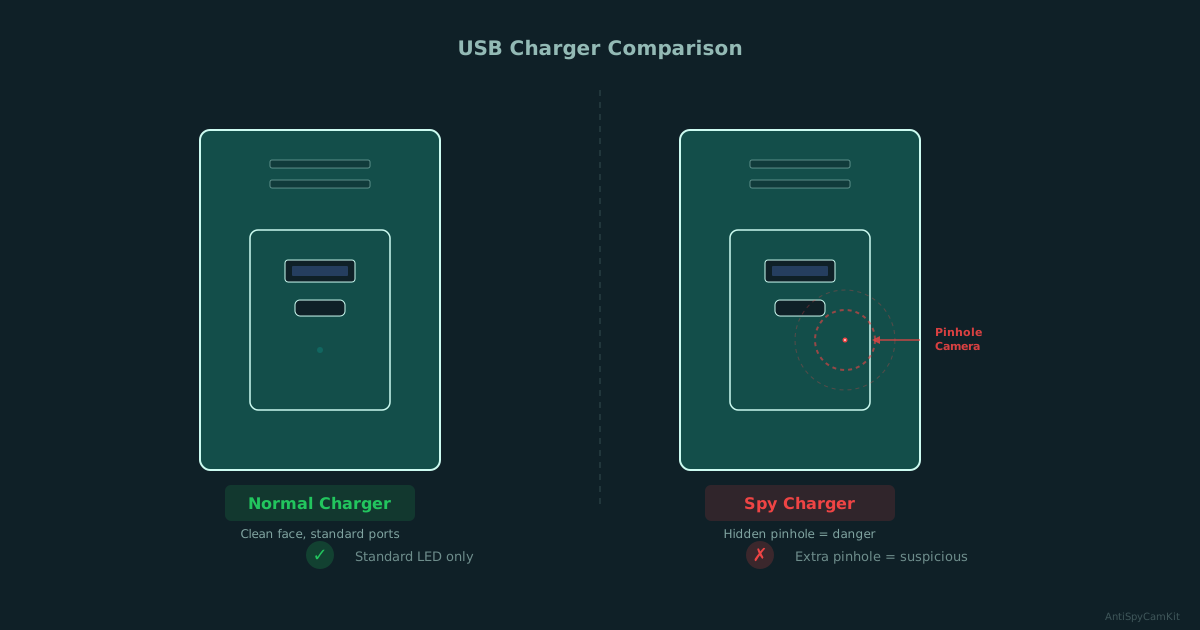
USB wall chargers are a common spy camera disguise. A camera-equipped charger looks almost identical to a real one. Check any USB charger already plugged in when you arrive:
- Look for a tiny pinhole on the face of the charger
- Check if the charger feels heavier than normal
- Replace pre-installed chargers with your own if you’re unsure
Power strips near the bed can also conceal cameras. Inspect them and consider moving or unplugging suspicious ones.
Air vents and decorative items
Air vents are easy to overlook and provide a perfect hiding spot. Use your phone flashlight to illuminate inside each vent — a camera lens will reflect light as a distinct bright spot.
Also check:
- Picture frames facing the bed or bathroom
- Artificial plants or flower arrangements
- Air fresheners and decorative objects
- Stuffed animals or gift items
- Books or objects that seem oddly positioned
Flashlight lens sweep
Dim the lights. Hold your phone flashlight near eye level and sweep it slowly from side to side across the room. A camera lens gives a small, sharp glint that stays visible as you move to a second and third angle. Focus on smoke detectors, vents, clocks, chargers, outlet plates, and picture frames.
Signs of tampering
Look for mirror edges that look recently resealed, misaligned screws on fixtures, and tiny pinholes in hooks, dispensers, or trim.
Confirm before you conclude
Before you decide that something is a camera:
- Check it again from a second angle
- Compare it to a similar fixture nearby
- Rule out common false positives such as router LEDs, glossy screws, and reflective trim
How can you use your phone to detect hidden cameras?
Your smartphone is a surprisingly effective detection tool, especially for cameras with infrared night vision. For a deeper iPhone/Android walkthrough, use our phone hidden camera detection guide.
Phone camera IR detection
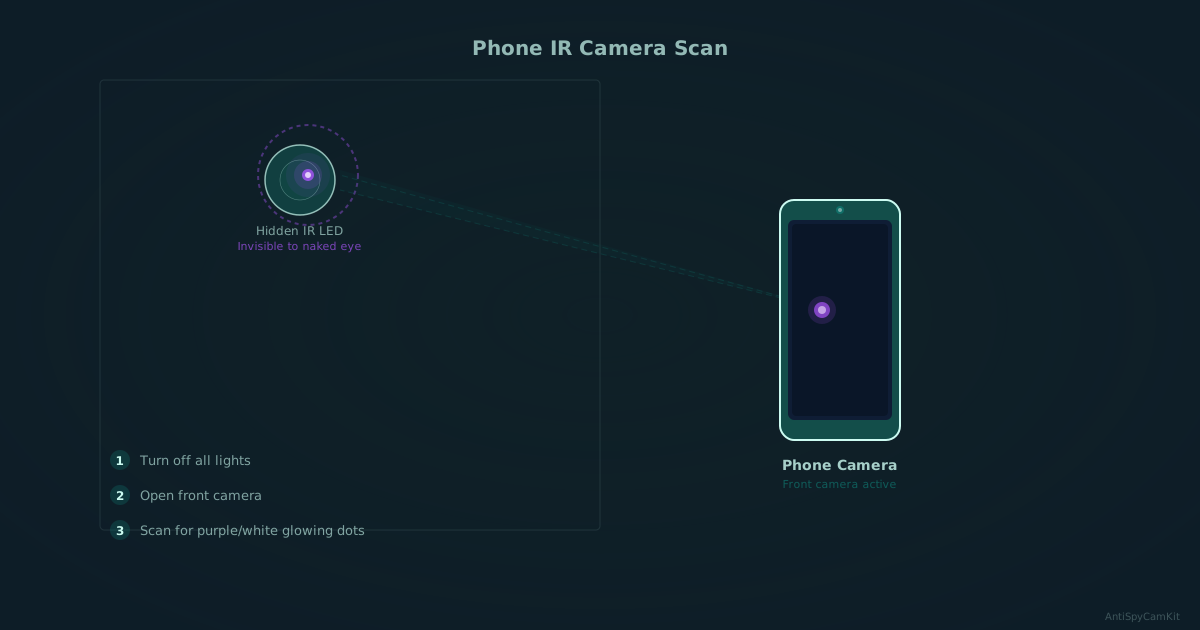
Night-vision cameras use infrared LEDs to see in the dark. These LEDs are invisible to the naked eye but visible to many phone cameras.
How to do it:
- Turn off all lights in the room — make it as dark as possible
- Open your phone’s camera app
- Use the front-facing camera — it typically lacks an IR filter, making it more sensitive to infrared light
- Slowly scan every surface, corner, and object in the room
- Look for small purple or white glowing dots on your screen
If you see a glowing dot that isn’t visible to your naked eye, investigate that spot closely. It’s likely an IR LED from a camera.
Wi-Fi network scanning
Wireless cameras need to connect to a network. Use a free app like Fing (available on iOS and Android) to scan the local Wi-Fi network:
- Connect to the room’s Wi-Fi
- Run a network scan
- Look for devices with camera-related manufacturer names
- Note any unfamiliar devices — cameras often appear as generic IoT devices
This won’t catch cameras on a separate network or those that record locally, but it’s a quick check.
Magnetic field detection
Some phone-based detection apps use your phone’s magnetometer to detect the electromagnetic fields produced by electronic devices. While less reliable than visual or IR methods, it can help identify hidden electronics in walls or objects.
Walk slowly around the room with the app running and investigate any strong readings near suspicious locations.
When to upgrade from phone to hardware
Phone methods are excellent for quick arrival checks, but if you’re staying multiple nights, traveling frequently, or found something suspicious during your phone sweep, a dedicated detector adds checks your phone cannot do.
Hardware detectors offer advantages phones can’t match:
- ✅ Lens detection that works on powered-off and non-transmitting cameras
- ✅ RF scanning with dedicated antennas and better sensitivity than phone apps
Escalate right away if:
- You see a clear lens opening aimed at a private area
- A device looks newly installed or tampered with
- You get repeated suspicious signals from the same spot
- The host or manager is evasive or dismissive when you ask
Phone checks are weak against wired cameras, cameras that record to an SD card, and dormant or motion-triggered devices.
The clearest hardware upgrade: lens-first detection
For travelers who prioritize lens detection certainty, a dedicated lens finder is a clear upgrade from phone methods. Unlike flashlight sweeps that require perfect lighting and angles, lens detectors use optical technology to reveal camera lenses regardless of whether they’re powered on or transmitting.

SpyFinder Pro
Best for Hotel Room Sweeps
Shows a camera lens as a bright red glint. Works on powered-off and wired cameras that phone methods miss, as long as the lens is in view.
- Lens detection that does not need the camera to be on
- Simple one-handed operation
Best for: Frequent travelers, business travelers, anyone staying in hotels or Airbnbs who wants a reliable privacy sweep tool.
Read our full review: SpyFinder Pro review
What dedicated detector devices work best?
For travelers who want more thorough protection, dedicated detection devices add checks your phone cannot do.
RF (Radio Frequency) detectors
RF detectors scan for wireless signals emitted by transmitting cameras. They’re effective against Wi-Fi cameras and cellular-connected cameras. An RF detector can sweep a room in minutes.
Limitations: RF detectors cannot find cameras that record to a local SD card or are hardwired. They also pick up signals from legitimate devices (phones, routers), so you need to learn to distinguish these.
Lens finders
Lens finders use a ring of red LEDs to create a bright reflection off any camera lens in the room. You look through a viewfinder while the LEDs flash, and any lens in your field of view will produce a bright, distinctive glint.
Lens finders work on wireless and wired cameras, on or off, as long as the lens is in your line of sight.
For detailed product recommendations, see our best hidden camera detectors guide. For Airbnb-specific advice, see our complete Airbnb guide.
What can’t consumer detectors find?
Each consumer method has a blind spot. A camera can slip past a quick sweep if it:
- Is hardwired and sends no wireless signal, so an RF detector has nothing to find
- Uses a very small pinhole lens that is hard to spot by eye
- Is built into a permanent fixture such as a ceiling tile or bathroom fitting
- Has no IR illumination, so the phone infrared check shows nothing
This doesn’t mean your sweep is pointless. Many hidden cameras sold online are cheap consumer devices disguised as chargers, clocks, and smoke detectors, and those are what this sweep checks. If you’re in a high-risk situation, consider a professional bug sweep service.
What should you do if you find a hidden camera?
Finding a camera is alarming, but it’s important to respond correctly:
- Don’t touch or remove it. It’s evidence. Disturbing it could compromise a criminal investigation.
- Take photos and video of the camera and its location from multiple angles.
- Note the exact position — which direction it faces, what it can see.
- Leave the room and contact hotel management or the property host.
- Call local police and file a report. Hidden cameras in private spaces are a criminal offense in many places.
- Report to the platform (Airbnb, Booking.com, etc.) with your evidence.
- Document everything — dates, times, who you spoke to, reference numbers.
If you’re in an Airbnb, the platform’s security camera policy, in effect since April 30, 2024, says security cameras are not allowed inside listings, regardless of their location, purpose or prior disclosure. Report any indoor camera to Airbnb.
Quick reference: the 5-minute sweep checklist
Run through this sequence every time you check into a new room:
- Doorway check: Note what faces the bed, shower, and changing area
- Mirrors — Inspect edges and nearby fixtures; the fingertip test cannot establish safety
- Smoke detectors — Look for pinholes, check positioning
- USB chargers — Inspect or replace pre-installed chargers
- Clocks & electronics — Check anything facing the bed
- Phone IR scan — Lights off, front camera, scan all surfaces
- Wi-Fi scan — Run Fing or similar app on room network
- Bathroom — Check vents, fixtures, mirrors, hooks
- Decorative items — Inspect anything with line of sight to key areas
Need gear? See our best hidden camera detectors. To protect the door and your own devices, see the travel privacy kit.
Room-by-room hidden camera checklist
For a longer stay, go room by room. To tick items off on your phone as you go, use our interactive checklist.
Before you start, turn off the lights and close the blinds. Some hidden cameras have small indicator LEDs that show only in the dark.
Bathroom
- Smoke detectors: look for tiny lens holes
- Air fresheners and dispensers: look for pinhole openings
- Outlets and power strips: look for lens-sized holes
- Mirror edges and nearby fixtures: inspect them without removing anything
- Tissue box holders, soap dispensers, and shower hooks
- Ceiling tiles and vents: look for anything recessed or out of place
- Towel hooks, robe hooks, and wall-mounted accessories
Bedroom
- Alarm clocks and digital displays: look for lens holes on the face
- Smoke detectors and carbon monoxide detectors
- Lamps, lampshades, and nightlights
- Picture frames, wall art, and decorative items that face the bed
- USB chargers and power adapters plugged into outlets
- Air vents and HVAC registers: look behind the slats
- Stuffed animals, books, or decorative objects near the bed
- The area behind the TV and around its bezel
Living area
- Bookshelves and decorative objects at eye level
- Potted plants and artificial flower arrangements
- Router, modem, and cable boxes: look for extra lenses
- Light fixtures, recessed lighting, and ceiling fans
- Wall-mounted speakers, intercoms, and thermostats
- Couch cushions and furniture seams that face seating areas
Ceiling, walls, and fixtures
- Compare all smoke detectors. Does one look different from the others?
- Wall clocks: look for tiny lens holes in the face or frame
- Sprinkler heads: look for anything that does not match the other heads
- Motion sensor lights: look for anything embedded in the housing
- Exit signs and emergency lighting (in hotel rooms)
Electronics
- Scan the Wi-Fi network for unknown devices
- USB charger adapters, a common spy camera disguise
- Bluetooth speakers and smart home devices
- Power banks or battery packs left in the room
- Any device with a small, dark circle that could be a lens
Airbnb extras
- Decorative objects that do not match the listing photos
- Smart displays or clocks added near private areas
- New USB hubs or adapters near beds
- Router shelves, bookshelves, and wall decor aimed at seating or sleeping areas
Get the free checklist
Printable hidden camera detection checklist + gear deals. Free, no spam.
Free updates. Unsubscribe anytime.
Frequently Asked Questions
Can my phone detect hidden cameras?
What is the fingertip test for mirrors?
Where should I look for hidden cameras in a hotel room?
Are hidden cameras legal in Airbnbs?
Do RF detectors find all hidden cameras?
What to Do Next
Related Guides

How to Find Hidden Cameras with iPhone and Android (2026)
Use your iPhone or Android to detect hidden cameras with built-in tools. Step-by-step: flashlight sweep, IR check, WiFi scan, and when to upgrade to gear.
Read guide
Find Hidden Cameras with Wi-Fi Scanning - Free Phone Method
Your phone finds Wi-Fi-connected cameras in minutes. Use Fing to scan the network, spot unknown devices, and flag camera MAC addresses — free step-by-step.
Read guide
How to Detect Hidden Cameras in Changing Rooms (2026)
How to check changing room cameras in fitting rooms & bathrooms using a 5-minute sweep, phone-first checks, and legal-safe evidence steps if you find one.
Read guide