How to Find Hidden Cameras in an Airbnb: 2026 Guide

Disclosure: This page contains affiliate links. We may earn a commission at no extra cost to you. We research products from manufacturer specifications and published reviews; we do not test them ourselves. Full disclosure.
Key Takeaways
- Airbnb's policy bans security cameras that monitor any indoor space. An indoor camera breaks the policy and may break the law.
- A flashlight lens sweep in a dark room is a useful free check.
- Wi-Fi scanning apps like Fing can list cameras on the same network. They miss cameras on another network or with no Wi-Fi.
- No single method catches everything — combine visual, IR, Wi-Fi, and RF checks.
Need the full method stack? Start with our full room sweep guide for hidden cameras, then use this page for scenario-specific steps.
Hidden cameras in rentals are a real privacy risk, and Airbnb stays are no exception. Airbnb’s ban on indoor cameras took effect on April 30, 2024, but a policy does not stop a host who breaks it. Here is how to check your stay with methods you can use in minutes.
What You’ll Learn
- Airbnb’s April 2024 camera ban — what changed and what still isn’t covered
- Before you book: red flags in reviews, host profiles, and listing photos
- How to report hidden cameras to Airbnb — step-by-step process and refund leverage
- Documenting for refunds — what evidence Airbnb requires and how to escalate
- Understanding host liability — when confrontation is safe and when to just report
- What “disclosure” actually means — and when hosts violate the policy
Airbnb’s April 2024 Indoor Camera Ban: What Actually Changed
Since April 30, 2024, Airbnb’s policy bans security cameras and recording devices that monitor indoor spaces. Know what the policy covers and what it does not.
What’s NOW Banned
Under Airbnb’s policy:
- Hidden security cameras, anywhere
- Security cameras and recording devices that monitor any indoor space, such as a hallway, bedroom, bathroom, living room or guest house, even if they are turned off
- Cameras in the common areas and shared spaces of private room listings
- Cameras over outdoor areas with a greater expectation of privacy, such as an enclosed outdoor shower or a sauna
What’s STILL Allowed (With Disclosure)
Airbnb’s policy allows these:
- Outdoor security cameras, if the listing discloses where they are
- Doorbell cameras that monitor a front door or a building hallway
- Noise decibel monitors that measure sound levels but do not record audio, if they are not in a bedroom, bathroom or sleeping area
The key word is “disclosed.” An outdoor camera must appear in the listing. Any indoor camera breaks Airbnb’s policy, and a hidden one may also break local law.
Why Hosts Keep Breaking the Ban
Even with the ban in place:
- Hosts can claim “I forgot to remove it” or “It was already here”
- Enforcement is complaint-based (Airbnb only investigates if guests report)
- Previous recordings may already exist and be shared
- Some hosts simply ignore the policy believing the risk is worth it
This is why your personal detection matters: Airbnb’s ban only works if guests report violations. You’re the enforcement mechanism.
Before You Book: Vetting Airbnb Listings for Hidden Camera Risk
Prevention is infinitely better than detection. Smart pre-booking research eliminates most high-risk properties before you ever arrive.
Red Flags in Listing Photos and Descriptions
Suspicious camera indicators in photos:
- Excessive security equipment visible (multiple devices, professional monitoring setups)
- Close-up professional photos of bedrooms/bathrooms (unusual framing)
- Photos taken from angles that seem like surveillance angles
- Smart displays visible in private areas (Echo Show, Nest Hub, security systems)
- Host mentioning “advanced security” or “monitoring” without specifics
Suspicious host profile signals:
- Recently created profile with very few reviews
- Reviews mentioning “privacy concerns,” “felt watched,” “uncomfortable,” “hidden cameras”
- Host responses to privacy questions that seem evasive or defensive
- Multiple guests canceling immediately after arrival (suggests cameras found)
- Host who seems overly interested in guest activities/schedules
Listing description red flags:
- Vague mention of “security system” without specifics
- “Owner nearby and may check property” (access opportunity)
- Photos showing what look like concealment items positioned oddly
- No clear list of what “devices” are in the rental
- Listing that’s been reposted multiple times (previous guests complained)
How to Read Reviews for Privacy Clues
Search for these keywords in reviews:
- “Camera” (look for context — legitimate or suspicious?)
- “Watched,” “uncomfortable,” “unsafe,” “privacy”
- “Host came in without knocking” (access patterns)
- “Devices we didn’t expect” (discovery of equipment)
- “Felt like being monitored”
Also note:
- Very high ratings but vague reviews (potential fake reviews)
- Reviews from long-term guests who wouldn’t have discovered cameras
- Lack of recent reviews (could mean property was taken down)
- Female travelers’ reviews specifically (they often mention privacy concerns)
Checking the Airbnb Listing Itself
Before booking, verify:
- Does the listing disclose cameras? Look for “Cameras and/or recording devices” disclosure
- If cameras are disclosed, where exactly? (Outdoor only = good; bedroom = avoid)
- Are there photos of recording equipment? (Legitimate hosts show what they have)
- Does it say “No cameras”? (This is what you want, but verify at arrival)
Smart pre-booking questions to ask the host:
- “Are there any cameras in the property? If yes, where and what do they record?”
- “Are there any smart home devices (Echo, Nest, etc.)?”
- “Will you or any staff enter the bedroom/bathroom during the stay?”
- Get their answers in writing through Airbnb messaging
Booking Strategy: Reduce Your Risk Automatically
Choose properties that self-select for privacy:
- Superhost status (not foolproof, but more accountable)
- 50+ reviews with 4.8+ rating (established track record)
- Reviews specifically mentioning “privacy” positively
- Boutique hotels on Airbnb (more professional management than individual hosts)
- Larger properties with professional staff (more oversight)
Avoid these property types entirely:
- New listings with no reviews
- Listings with vague descriptions of devices/equipment
- Private rooms in shared homes with poor reviews about privacy
- Entire apartments with multiple “smart home” devices mentioned
- Listings that have been frequently reposted (sign of problems)
Detecting Hidden Cameras in Your Airbnb: Streamlined Approach
For the comprehensive detection methodology, see our Room Sweep Guide: How to Check Any Room for Hidden Cameras. Here’s the Airbnb-specific streamlined version you can do in 15 minutes.
Step 1: Turn Off All Lights
Dark rooms make camera detection much easier. Close curtains and eliminate all light sources.
Step 2: Use Flashlight Sweep Technique
Use your phone’s flashlight to systematically scan every surface. Camera lenses create distinct reflections—look for small glints that catch light differently than normal surfaces. For the full flashlight technique plus 6 more phone-based methods, see our guide to finding hidden cameras with your phone.
Search pattern: Start at one corner and work methodically around the room. Check high and low—cameras can be placed anywhere from floor outlets to ceiling fixtures.
Step 3: Inspect Suspicious Objects
Pick up and examine any object that could conceal a camera. Look for:
- Small holes (pinholes are camera favorites)
- Unusual weight or construction
- Wires that don’t match the device
- Recent modifications or fresh mounting
Step 4: Check All Mirrors
Check mirrors visually: The fingertip gap test cannot reliably identify a two-way mirror or establish whether a camera is present. A visible gap does not rule out a two-way mirror. Mirror manufacturer Two Way Mirrors explains that acrylic two-way mirrors can pass the fingernail test.
Visually inspect mirror edges and nearby fixtures without removing them. Reflections alone do not identify a camera. If you see a suspicious device, leave the private area and report its location to management.
What Technology Should I Use to Find Cameras?
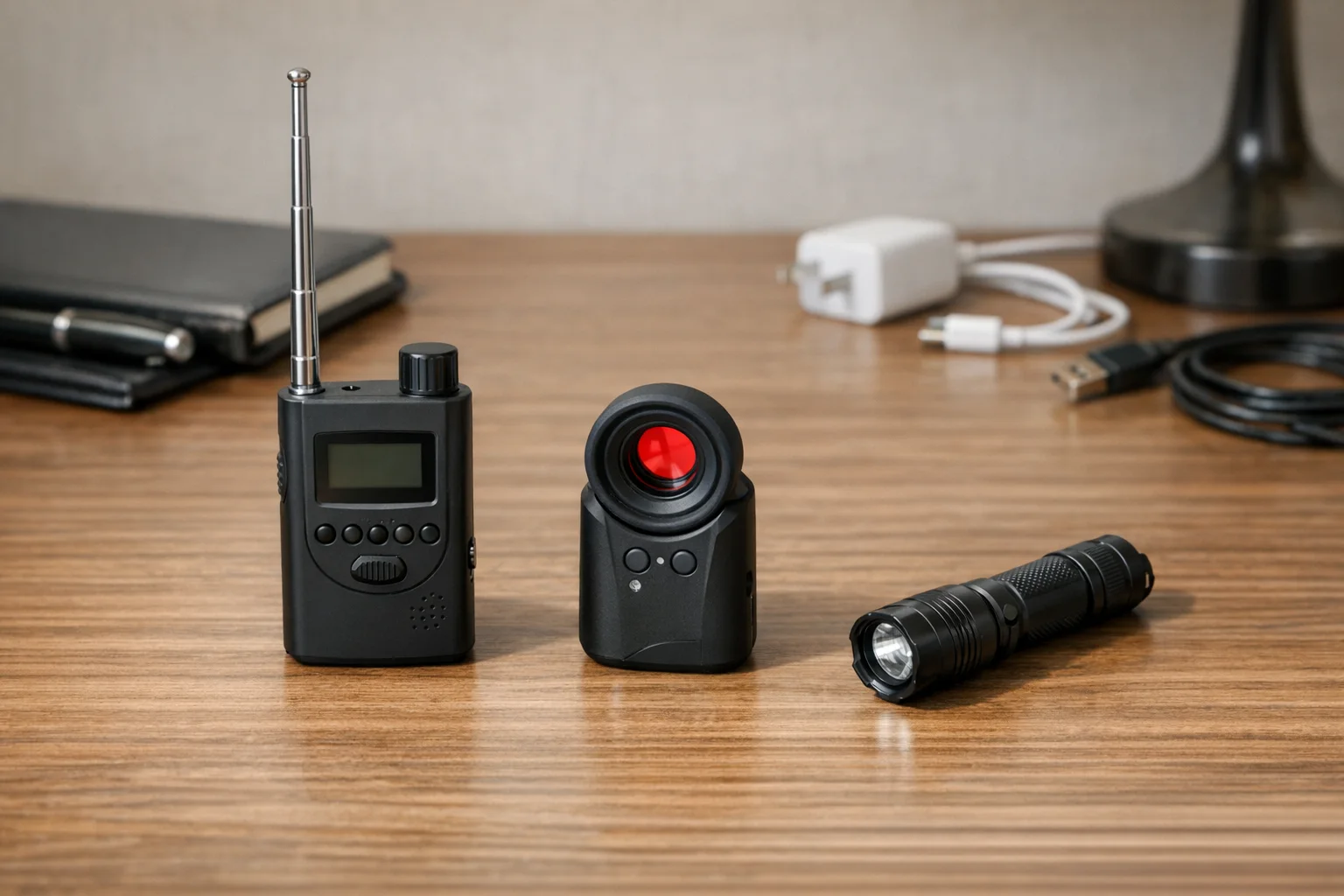
Detection tools can add coverage that a phone cannot. None of them finds every camera.
RF Signal Detectors
Best for: Cameras that transmit wirelessly (WiFi, Bluetooth, cellular)
How they work: These devices scan radio frequencies and alert you to transmission signals that could indicate hidden cameras.
Key features:
- Auto-detection of WiFi cameras
- GPS tracker detection
- Audio alert and LED indicators
- Battery level display
Optical Lens Finders
Best for: Any camera with a visible lens (wireless or wired)
How they work: These devices use LED arrays to create reflections off camera lenses, making them visible through a special viewfinder.
Key features:
- Works on powered or unpowered cameras
- Pocket-sized for travel
- Instant visual confirmation
Multi-Function Detectors
Best for: Comprehensive detection in one device
Key features:
- Several detection modes in one device, often RF and lens finding
- Silent vibration mode on some models
- Check each listing for the modes it actually has
How Do I Check the WiFi Network for Cameras?
Many hidden cameras connect to WiFi for remote viewing, making network scanning highly effective.
Using Your Phone
Download a network scanner app like Fing (free for iOS and Android).
Process:
- Connect to the Airbnb’s WiFi
- Open Fing and run a network scan
- Review all connected devices
- Look for cameras, DVRs, or unknown devices
- Check device names for camera brands (Hikvision, Dahua, etc.)
Using Your Phone’s Camera for Infrared Detection
Many phone cameras can detect infrared light invisible to your eyes. iPhone and Android handle IR differently — our phone detection guide explains which models work and which don’t.
Test your phone first: Point a TV remote at your front-facing camera and press buttons. If you see flashing white or purple lights on your phone screen, your camera can detect infrared.
Detection process:
- Turn off all room lights
- Open your phone’s camera app
- Switch to front-facing camera
- Slowly scan the room looking for unexpected light sources
- Infrared LEDs will appear as bright dots on your screen
Should I Use Detection Apps?
Hidden camera detection apps have limited effectiveness but can complement other methods.
WiFi scanner apps (like Fing) are genuinely useful for identifying network-connected cameras.
“Camera detector” apps claiming to use magnetometers or other phone sensors are mostly ineffective. Your phone’s hardware isn’t designed for professional surveillance detection.
Better approach: Use your phone’s actual camera and flashlight rather than relying on apps with questionable effectiveness. We rank the best detection apps that actually work in our phone detection guide.
Reporting to Airbnb: The Step-by-Step Process That Gets Results

SPYFINDER PRO
Best Overall — Lens Detection
Optical lens finder that works on cameras whether they are on or off
- Detects powered & unpowered cameras
- LED lens finder
- Pocket-sized
2025 Upgraded RF Detector
Best RF Detection
Detects WiFi, Bluetooth, and cellular camera signals from 1MHz to 10GHz
- 1MHz–10GHz frequency range
- WiFi + Bluetooth + cellular
- LED signal strength display
Viutopot Dual Lens Finder
Best Dual Lens
Optical lens finder that combines lens reflection and infrared scanning
- Lens reflection detection
- Infrared scanning
- Compact travel design
Step 1: Before You Report Anything
Document everything:
- Take clear photos of the camera (location, appearance, model if visible)
- Take photos showing the camera’s field of view (what could it see?)
- Take photos showing how it was hidden/concealed
- Screenshot your booking confirmation
- Screenshot any WiFi device lists if applicable
- Write down the exact date/time you discovered it
- Write down everything you did before discovering it (shower, changing, etc.)
Do NOT:
- Touch or move the device
- Unplug or remove batteries
- Delete anything from the WiFi
- Assume the host will remove it (they might just move it)
Step 2: Contact Airbnb’s Safety Team
Ways to report:
Option A: In the app
- Open your trip in the Airbnb app
- Go to the Help Center and contact Airbnb about the reservation
- Upload your photos
- Describe exactly what you found and where
Option B: By phone
- Call Airbnb customer support: 1-855-424-7262 (US/Canada)
- Tell them: “I found a hidden camera in my Airbnb”
Option C: In writing, for detailed documentation
- Include booking confirmation number
- Attach all photos clearly labeled
- Write detailed description of camera location and what it could record
- Include your timeline (when you arrived, when you discovered it, etc.)
Step 3: What Airbnb Will Ask For
Be prepared with:
- Description of the device (color, size, brand if visible)
- Exact location in the property (which room, what furniture/fixture)
- Photos from multiple angles
- What the camera’s field of view included
- Whether you stayed, left, or relocated
- Police report number (if you filed one)
Step 4: What Airbnb Should Do (And What to Demand)
Know the policy: Airbnb’s rebooking and refund policy offers a full or partial refund, or help to rebook a similar place. The amount depends on how serious the issue is and how much of the stay it affects. Report the issue within 72 hours after you find it. The policy does not name hidden cameras, so cite the camera policy too.
Ask for:
- A full refund of the booking
- Help to rebook a comparable place
- Your relocation costs, with receipts
If they offer less, escalate:
- “I want to escalate this to your Trust and Safety team”
- “This is a criminal violation of privacy policy”
- “I expect full refund plus compensation for violation of service”
- “I’m filing a credit card chargeback if this isn’t resolved”
Step 5: If Airbnb Doesn’t Cooperate
Escalation options:
- File a credit card dispute or chargeback
- Report the host to your state’s Attorney General
- Post a factual review
- Contact local law enforcement (they can pressure Airbnb)
- Consult a lawyer
Credit card chargeback:
- Tell Airbnb: “If this isn’t resolved, I’m filing a chargeback with my credit card”
- Follow through if needed
- Document everything for the chargeback claim
The Host Confrontation Question: When to Report vs. When to Leave
Whether to confront the host depends entirely on safety and strategy.
When You Should NOT Confront
Just report and leave if:
- You feel unsafe or uncomfortable
- The host has access and could become aggressive
- You’re alone and unsure of the host’s reaction
- The camera is in a bedroom/bathroom (criminal violation, not a gray area)
- You’re traveling internationally and unfamiliar with law enforcement
In these cases: Report to Airbnb, take the refund, and let them handle it.
When Confrontation Might Be Safe
You could message the host IF:
- The camera is disclosed/legitimate (just broken/positioned wrong)
- You’re asking for clarification: “I saw a camera in [location]. Can you explain what it monitors?”
- You’re documenting their response for the complaint
- You have a way to leave safely immediately after
But remember: Even “innocent” confrontations can escalate. Your safety > confrontation.
Quick Reference: Airbnb Detection + Reporting Checklist
Before arrival:
- Reviewed listing for camera disclosures
- Read recent reviews for privacy complaints
- Checked host profile for red flags
- Took screenshot of listing
Upon arrival (before unpacking):
- Scanned room visually for suspicious objects
- Used phone IR camera in dark
- Ran Fing WiFi scan
- Checked for smart displays with camera tabs
If you find something:
- Took photos from multiple angles
- Documented camera location and field of view
- Did NOT touch or move device
- Did NOT unplug or disable it
- Called police (if criminal/undisclosed)
- Reported to Airbnb through customer support or the app
- Took screenshot of booking confirmation
- Documented all communication with Airbnb
For Complete Detection Methodology
See our Room Sweep Guide: How to Check Any Room for Hidden Cameras for the comprehensive, professional-grade detection process that works in any setting.
Frequently Asked Questions
Can Airbnb hosts legally have cameras inside the rental?
No. Since April 30, 2024, Airbnb’s policy does not allow hosts to have security cameras or recording devices that monitor any indoor space, even if they are turned off. Hosts must disclose the location of outdoor cameras in the listing.
What should I do immediately if I find a hidden camera?
Don’t touch or unplug the device. Document it with photos and video, call local police (not just Airbnb), secure alternative accommodation, and report it to the platform immediately.
Do RF detectors work for all hidden cameras?
RF detectors only work for cameras that transmit wirelessly (WiFi, Bluetooth, cellular). They won’t detect cameras that record locally to SD cards or wired cameras. Use several methods, and know that none of them proves a room is clear.
Can my phone really detect hidden camera infrared lights?
Yes, but only with certain phone cameras. Test your phone first by pointing a TV remote at your front-facing camera and pressing buttons. If you see flashing lights on screen, your camera can detect infrared.
Are there any free ways to detect hidden cameras?
Yes. Use your phone’s flashlight to look for lens reflections, check the WiFi network for unknown camera devices, physically inspect suspicious objects, and inspect mirror edges without removing fixtures. These checks cannot rule out hidden cameras.
Can I get money beyond a refund?
Possibly. Airbnb’s rebooking and refund policy covers a full or partial refund or rebooking help. Ask for:
- A full refund of the booking
- Your relocation costs, with receipts
- Compensation for the privacy violation
For higher compensation:
- Escalate to Trust & Safety
- Mention credit card chargeback
- Consult a lawyer
- State’s Attorney General can intervene
How long does Airbnb investigation take?
It varies. Ask for a refund while they investigate. If they are slow, escalate, mention a chargeback, or file a complaint with your state’s Attorney General. Do not wait months. Push for a resolution.
Should I post about this on social media?
Be careful. Stick to factual statements. Don’t post before contacting Airbnb (damages resolution). Don’t post the host’s identity without proof. Focus on warning others factually without defamation. After Airbnb confirms and acts, sharing your experience helps others.
Your Airbnb Safety Strategy Going Forward
Don’t let one bad experience make you paranoid, but do stay smart:
For every future booking:
- Before booking: Read recent reviews specifically for privacy concerns
- At booking: Check listing for camera disclosures
- Upon arrival: Do the 15-minute Airbnb check
- If anything feels wrong: Report and relocate, and ask for a refund under Airbnb’s rebooking and refund policy
The bottom line: Airbnb’s ban is real. But without guest reports, hosts who break it stay undetected. Your reports directly protect future guests.
Related Guides
Get the free checklist
Printable hidden camera detection checklist + gear deals. Free, no spam.
Free updates. Unsubscribe anytime.
Frequently Asked Questions
Can Airbnb hosts legally have cameras inside the rental?
What should I do immediately if I find a hidden camera?
Do RF detectors work for all hidden cameras?
Can my phone really detect hidden camera infrared lights?
Are there any free ways to detect hidden cameras?
What to Do Next
Related Guides

How to Find Hidden Cameras with iPhone and Android (2026)
Use your iPhone or Android to detect hidden cameras with built-in tools. Step-by-step: flashlight sweep, IR check, WiFi scan, and when to upgrade to gear.
Read guide Find Hidden Cameras with Wi-Fi Scanning - Free Phone Method
Your phone finds Wi-Fi-connected cameras in minutes. Use Fing to scan the network, spot unknown devices, and flag camera MAC addresses — free step-by-step.
Read guide
How to Detect Hidden Cameras in Changing Rooms (2026)
How to check changing room cameras in fitting rooms & bathrooms using a 5-minute sweep, phone-first checks, and legal-safe evidence steps if you find one.
Read guide