RF Detector vs Lens Finder - Which One Do You Actually Need
Disclosure: This page contains affiliate links. We may earn a commission at no extra cost to you. We research products from manufacturer specifications and published reviews; we do not test them ourselves. Full disclosure.
Need the full method stack? Start with our How to Do a Complete Room Sweep for Hidden Cameras, then use this page for scenario-specific steps.
Quick answer: RF detectors only find wireless cameras that are actively transmitting, while lens finders detect both wired and wireless cameras by spotting reflections from camera lenses.
Hidden cameras come in two main varieties: wireless devices that transmit signals and wired cameras that store footage locally or stream through cables. This fundamental difference determines which detection method you need.
The Core Difference: Signal vs Optics
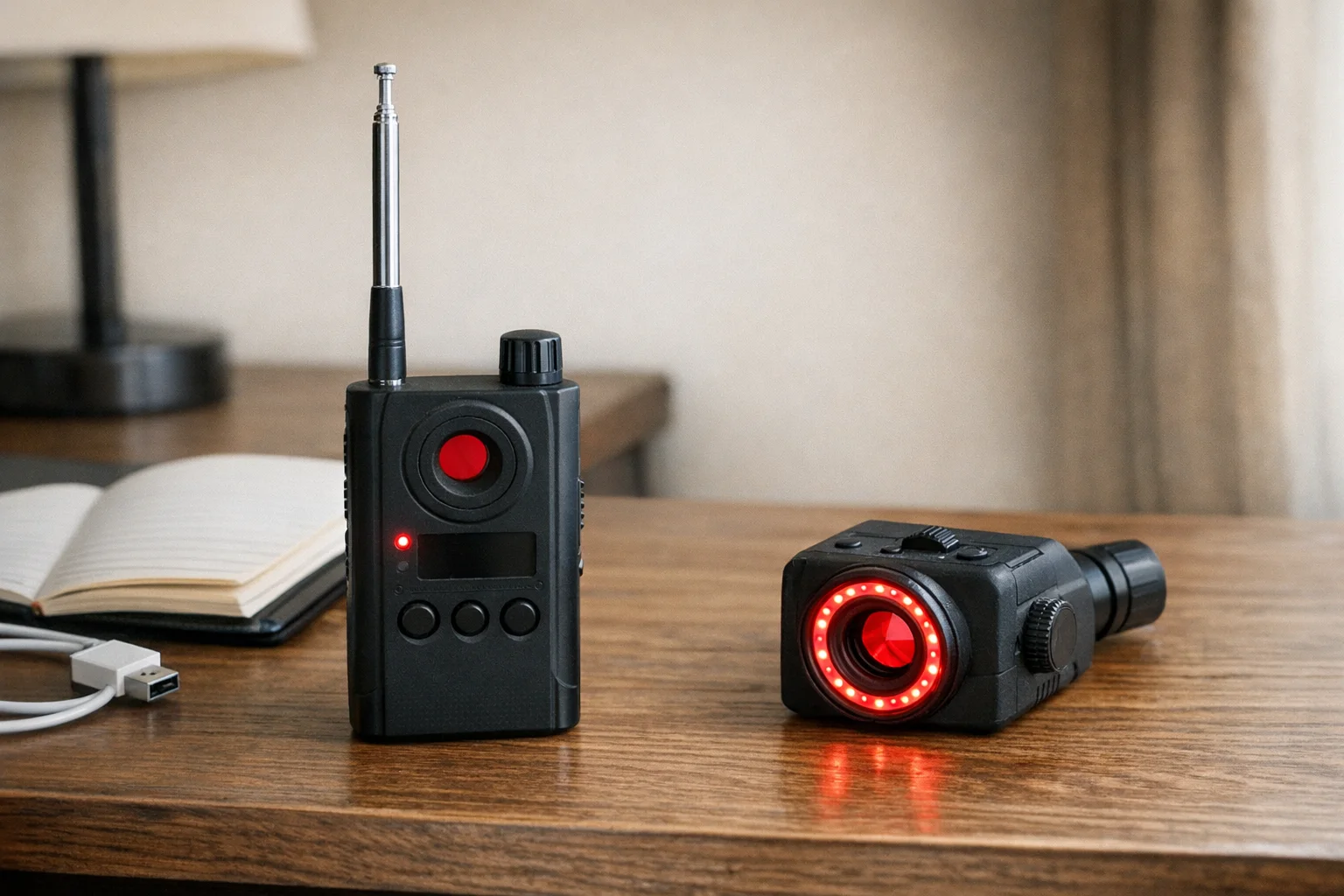
RF detectors scan for radio frequency signals emitted by wireless cameras, GPS trackers, and listening devices. Each model covers its own frequency range, so check the maker’s specifications before you buy.
Lens finders shine bright LEDs at the room. A camera lens reflects the light back, so it shows as a bright point through the viewfinder. The SpyFinder Pro, for example, uses red LEDs (manual). This optical method works regardless of whether the camera is powered on or transmitting.
When RF Detectors Excel
Wireless Camera Detection
RF detectors shine at finding cameras that stream footage to remote locations. These devices constantly transmit data, creating radio signals that an RF scanner can pick up.
Best scenarios for RF detection:
- Airbnb and rental properties with Wi-Fi cameras
- Office surveillance sweeps
- Car bug detection
- Finding GPS trackers
- Detecting wireless audio bugs
Range and Convenience
An RF detector lets you sweep a large area quickly. The audio and vibration alerts mean you don’t need constant visual attention on the device. The JMDHKK K18+ is the best example in this category — it combines RF detection with other detection methods in one device.
When Lens Finders Win
Broader Coverage
Lens finders look for the lens itself, so they can find wireless, wired, powered-off, or even dummy cameras. They still need a line of sight, and a very small lens can be missed. The SpyFinder Pro is a dedicated lens finder built on this method. Our review covers what it can and cannot find, based on manufacturer specifications and published reviews.
Lens finders excel at:
- Hotel room checks for wired or offline cameras
- Bathroom and changing room sweeps
- Finding cameras in electronics or appliances
- Spotting dormant or motion-activated cameras
- Detecting old analog surveillance systems
No False Alarms from Electronics
RF detectors can trigger on WiFi routers, baby monitors, and other legitimate electronics. Lens finders do not react to radio signals, but glossy surfaces can still show false glints.
The Limitations You Need to Know
RF Detector Blind Spots
- Wired cameras: Completely invisible to RF detection
- Powered-off devices: No signal means no detection
- Local storage cameras: SD card cameras that don’t transmit
- Motion-activated cameras: Only detectable when actively recording
- False alarms: WiFi, Bluetooth, and other electronics trigger alerts
Lens Finder Constraints
- Line of sight required: Can’t detect cameras behind walls or inside sealed containers
- Manual scanning: You must physically look through the viewfinder and sweep methodically
- Lighting dependent: Works best in dim conditions; bright ambient light can wash out lens reflections
- Requires proximity: You must move close to each spot you check
Professional vs Budget Options
RF Detectors
- Basic RF detectors: Limited frequency range, simple audio alerts
- Mid-range devices: Wider frequency coverage, sensitivity adjustment
- Professional RF detectors: Wide spectrum coverage, frequency analysis, directional finding
Lens Finders
- Budget optical detectors: Basic LED illumination, simple viewfinder
- Professional lens finders: Adjustable LED intensity, better optics
Side-by-Side Comparison
| Feature | RF Detector | Lens Finder |
|---|---|---|
| Detects wireless cameras | ✅ Yes, while it transmits | ✅ Yes, when the lens is visible |
| Detects wired cameras | ❌ No | ✅ Yes |
| Detects turned-off cameras | ❌ No | ✅ Yes (lens still reflects) |
| False alarms from | Any RF source (routers, phones) | Shiny surfaces and glossy decor |
| Ease of use | Moderate (requires frequency tuning) | Easy (point and look) |
| Best environment | Hotels, Airbnbs, offices | Changing rooms, bathrooms |
| Learning curve | Medium | Low |
| Works through walls | Partial (frequencies vary) | No (requires sight line) |
| Portability | High (pocket-sized) | High (very compact) |
| Best for beginners | Moderate difficulty | Easiest to use |
| Best for coverage | Wider area sweeping | Thorough spot checking |
Use Case Scenarios
Different situations call for different tools. Here’s how to choose based on your specific scenario:
“I’m checking an Airbnb or hotel room”
Best choice: RF Detector
Rationale: A Wi-Fi camera transmits, so an RF scan can flag it without a close look at every object. An RF scan misses wired and offline cameras, so follow up with a lens check. The convenience factor is huge when you’re tired from travel and just want to check your room before settling in.
Quick process: Walk through the room with RF detector on high sensitivity. Any hits get marked for visual inspection with a flashlight.
”I’m in a changing room or bathroom”
Best choice: Lens Finder
Rationale: These spaces are private, and a camera there may be wired or record to a card, with no Wi-Fi signal to detect. A lens finder lets you systematically check all common hiding spots—mirrors, hooks, vents, fixtures—without drawing attention. Check a glint from a second angle to rule out shiny trim.
Quick process: Dim the lights, use the lens finder’s LED to scan smoke detectors, light fixtures, and mirror frames. The sparkle pattern is unmistakable when you spot a real lens.
”I’m moving into a new home”
Best choice: Both methods
Rationale: A new residence deserves comprehensive security assessment. Previous owners, contractors, or maintenance workers may have left devices. RF detection catches any active surveillance, while lens finding reveals dormant cameras left behind.
Complete sweep: RF detector first to map any active devices and frequencies, then lens finder for room-by-room thorough checking of common hiding spots. Combine both for complete peace of mind in a new space.
”I travel frequently”
Best choice: Combination device or RF detector + smartphone lens finder app
Rationale: Frequent travelers need convenience and broad coverage. A combination detector gives you both methods in one device. For maximum portability, RF detector in your bag plus a phone-based lens check creates a lightweight solution that covers both methods.
Travel strategy: Quick RF sweep upon arrival at any accommodation, follow up with physical inspection if any signals detected.
”I’m concerned about domestic abuse or stalking”
Best choice: Both methods, professional equipment
Rationale: An abuser may use wired devices or SD-card cameras that do not show up on a network scan. You need comprehensive coverage. Professional-grade equipment provides better sensitivity and reliability. Consider hiring professional counter-surveillance if you suspect sophisticated surveillance.
Safety consideration: Gather evidence carefully and with support from domestic violence advocates. Your safety is more important than finding every device.
”I’m a security professional doing a property sweep”
Best choice: All available tools
Rationale: Layer RF detection, lens finding, network scanning, and physical inspection, and write down what you checked. No combination proves a property is clean. In a 2026 UCL study, participants with consumer detectors still missed most hidden devices.
Can I Use Both? Why Serious Users Own One of Each
Yes, and serious privacy-conscious people should own both. Here’s why:
Complementary Coverage
RF detectors and lens finders detect completely different surveillance methods:
- RF detectors catch cameras that are actively transmitting — the cameras the installer intended you to find (if they’re confident about their connection)
- Lens finders catch cameras hidden with wires or offline storage — the cameras designed to avoid network detection
Each method covers a gap in the other, so use both.
Practical Workflow
Professional counter-surveillance follows this pattern:
-
RF sweep first (5-10 minutes)
- Walk through with detector on high sensitivity
- Mark any signal sources for investigation
- Covers large areas quickly
- Identifies active threats
-
Lens finder sweep second (15-30 minutes)
- Methodical room-by-room examination
- Focus on identified hot spots plus common hiding areas
- Provides visual confirmation of threats
- Catches dormant or wired devices missed by RF
-
Investigate all hits
- Any RF alert gets visual confirmation
- Any lens reflection gets physical inspection
- Document findings with photos
- Determine legitimacy of detected devices
Cost-Benefit Analysis
- Budget option: A single lens finder covers wired and offline cameras in your line of sight
- Standard option: One RF detector plus one lens finder covers both methods
- Combo option: A single combination device trades some quality for convenience
- Professional option: A professional RF detector plus a professional lens finder
Prices change often, so compare current listings. No consumer tool can prove a room is clean.
Real-World Scenarios Where Both Matter
Scenario 1: Airbnb with wired cameras
- RF detector finds nothing (wired, no transmission)
- Lens finder spots camera lens in smoke detector
- Both methods together catch what one alone misses
Scenario 2: Hotel with hidden WiFi surveillance
- Lens finder finds nothing (carefully hidden)
- RF detector alerts to WiFi device in wall cavity
- Both methods together catch what one alone misses
Scenario 3: Domestic surveillance situation
- Abuser uses mix of wireless cameras (monitored remotely) and wired cameras (recorded locally)
- RF detector catches wireless component
- Lens finder catches wired component
- Comprehensive evidence for law enforcement and court proceedings
Combination Devices: Best of Both Worlds?
Some detectors combine RF and lens detection in one device. Check the maker’s listing to confirm a model has both before you buy.
Combination device pros:
- Single device covers all camera types
- More cost-effective than buying separate tools
- Convenient for travel
Potential drawbacks:
- May compromise on the quality of each detection method
- More complex operation
- Higher failure risk (two systems in one device)
A Third Method: Thermal Imaging
How It Works
A thermal camera does not see visible light. It detects heat and assigns colors to the range of temperatures it measures (Teledyne FLIR). A camera that is switched on makes heat, so it can show as a small warm spot on a cooler wall, shelf or fixture. This works for wired, wireless and SD-card cameras, as long as the camera has power.
Researchers at Washington University in St. Louis and the University of Tennessee built a research prototype called HeatDeCam. It runs a small neural network on a smartphone to recognize the heat pattern of a spy camera, with or without a wireless connection. It is a published research system, not a product you can buy.
Strengths
- Independent of how the camera sends video: wired, Wi-Fi, or recording to a card, if it is powered
- Works in the dark: it reads heat, not light
Limits
- The camera must be on: a powered-off camera makes no operating heat
- No view through walls or glass: FLIR states that walls block infrared from the other side, and that glass and shiny metal act like a mirror for infrared (source). A camera behind a mirror or a glass panel can stay hidden.
- Every powered device shows as warm: chargers, clocks, routers and TVs all make heat, so each warm spot needs a physical check
- Cost and practice: a thermal camera or phone attachment costs more than an RF detector or lens finder, and reading the image takes practice
Thermal imaging is a supplement, not a replacement. Use it to check suspicious spots that an RF sweep or a lens check already flagged.
How to Choose Your Detection Method
For Most People: Start with Lens Detection
If you’re checking hotel rooms, Airbnbs, or suspicious areas occasionally, a lens finder covers the cameras an RF detector cannot see: wired, offline and powered-off cameras.
For Security Professionals: Dual Approach
Professional sweeps require both methods. RF detection for initial wide-area scanning, followed by methodical lens finding for comprehensive coverage.
For Frequent Travelers: Combination Device
A compact dual-function detector offers the best balance of coverage and portability for regular use.
Detection Strategy That Actually Works
Step 1: RF sweep the entire area first
- Walk through with RF detector on high sensitivity
- Mark any signal sources for investigation
- Note false positives from known electronics
Step 2: Methodical lens scanning
- Dim the lights for better lens reflection visibility
- Systematically scan suspicious locations
- Focus on common hiding spots: smoke detectors, picture frames, electronics
Step 3: Investigate alerts
- Any RF hit gets visual confirmation
- Any lens reflection gets physical inspection
- Check if devices have legitimate purposes
Common Hiding Spots by Detection Method
RF Detectors Excel At Finding:
- Wireless cameras in common areas
- Devices hidden in walls or ceilings
- Cars bugs and GPS trackers
- Cameras streaming to external locations
Lens Finders Catch:
- Wired cameras in bathrooms and bedrooms
- Cameras that record to local storage
- Cameras inside electronics or appliances
- Motion-activated security cameras
The Verdict: Which Do You Need?
Choose RF detection if:
- You primarily worry about wireless surveillance
- You need to sweep large areas quickly
- You’re concerned about GPS tracking or audio bugs
- You want maximum detection range
Choose lens finding if:
- You stay in hotels or rentals frequently
- You need to detect all camera types
- You prefer minimal false alarms
- You can invest time in methodical scanning
Choose both if:
- You want complete protection
- You’re a security professional
- You can afford combination devices
- Maximum peace of mind is worth the investment
Quick Buy Paths
- Want a lens-first option: SpyFinder Pro on Amazon
- Need balanced value with RF support: JMDHKK K18+ on Amazon
- Want a wider shortlist before deciding: Best Hidden Camera Detectors 2026
Which Should You Buy?
If budget allows: Get one of each. RF detectors and lens finders complement each other. RF flags transmitting devices, and a lens finder looks for the lens itself. Together they cover more than either one, but no tool can prove a room is clean.
If choosing only one:
- Choose an RF detector if your main worry is a Wi-Fi or other transmitting camera.
- Choose a lens finder if you want to find wired or offline cameras that RF detection misses.
The hybrid approach: If budget is limited, start with a lens finder for immediate protection, then add RF detection once you can afford it. Lens finders provide broader coverage across camera types, while RF detectors are more specialized for wireless threats.
Frequently Asked Questions
What’s the difference between RF detectors and lens finders?
RF detectors find cameras that transmit wireless signals, while lens finders spot camera lenses by the light they reflect. RF detectors miss wired cameras. Lens finders can find wired cameras, but they need a direct line of sight and can miss a small lens.
Can RF detectors find cameras that are turned off?
No, RF detectors only work on cameras actively transmitting signals. Powered-off or wired cameras won’t show up on RF detection.
Do I need both an RF detector and lens finder?
For better coverage, yes. RF detectors excel at finding wireless cameras from a distance, while lens finders catch wired cameras and devices that aren’t currently transmitting.
Which is better for hotel rooms?
Use both if you can. A lens finder can spot wired or offline cameras that an RF scan misses, and an RF detector can flag a transmitting camera you cannot see.
How much should I spend on a detector?
Prices change often, so check current listings. Spend enough to get the method you need: RF for wireless cameras, a lens finder for wired or offline cameras, or a combination device for both.
Your Next Steps
Start with understanding what you’re protecting against. A wireless camera can show up on an RF scan. A wired or offline camera needs a lens check or a visual search.
If you can buy only one tool, a lens finder covers the cameras an RF scan cannot see. Add RF detection when you need to sweep large areas or detect wireless devices specifically.
Remember: No single detection method catches everything. The most effective approach combines both technologies with systematic searching and healthy skepticism about your environment. For free checks with the phone you already carry, see how to detect hidden cameras with your phone.
Related Guides
Get the free checklist
Printable hidden camera detection checklist + gear deals. Free, no spam.
Free updates. Unsubscribe anytime.
Frequently Asked Questions
What's the difference between RF detectors and lens finders?
Can RF detectors find cameras that are turned off?
Do I need both an RF detector and lens finder?
Which is better for hotel rooms?
How much should I spend on a detector?
What to Do Next
Related Guides

How to Find Hidden Cameras with iPhone and Android (2026)
Use your iPhone or Android to detect hidden cameras with built-in tools. Step-by-step: flashlight sweep, IR check, WiFi scan, and when to upgrade to gear.
Read guide
Find Hidden Cameras with Wi-Fi Scanning - Free Phone Method
Your phone finds Wi-Fi-connected cameras in minutes. Use Fing to scan the network, spot unknown devices, and flag camera MAC addresses — free step-by-step.
Read guide
How to Detect Hidden Cameras in Changing Rooms (2026)
How to check changing room cameras in fitting rooms & bathrooms using a 5-minute sweep, phone-first checks, and legal-safe evidence steps if you find one.
Read guide