How to Tell If a Smoke Detector Has a Camera - Quick Checks
Disclosure: This page contains affiliate links. We may earn a commission at no extra cost to you. We research products from manufacturer specifications and published reviews; we do not test them ourselves. Full disclosure.
If you searched how to tell if a smoke detector has a camera, the short answer is this: treat every detector as normal until it fails a quick checklist. You are not trying to prove a conspiracy. You are trying to spot objective signs that something is off, then escalate cleanly if needed.
Smoke detectors are common camera hiding spots because they already sit high, have power nearby, and naturally face the room. A modified unit can give itself away through small physical clues when you check methodically.
1) Fast Answer: What to Check in 60 Seconds
Stand in the doorway and focus on line-of-sight to private areas. Then ask:
- Is the detector pointed unusually toward a bed, shower, or dressing area?
- Does it have a tiny dark pinhole that looks like a lens instead of a vent?
- Does one detector look different from others in the same unit?
- Do you see odd seams, glue marks, or a recently disturbed mounting plate?
If all four checks look normal, risk is lower. If one or more fail, move to the deeper inspection steps below.
2) Visual Signs: Real Detector vs Camera-Modified Detector
A real smoke detector has a consistent design language: venting pattern, test button, LED behavior, and predictable casing seams. A modified unit often introduces details that do not belong.
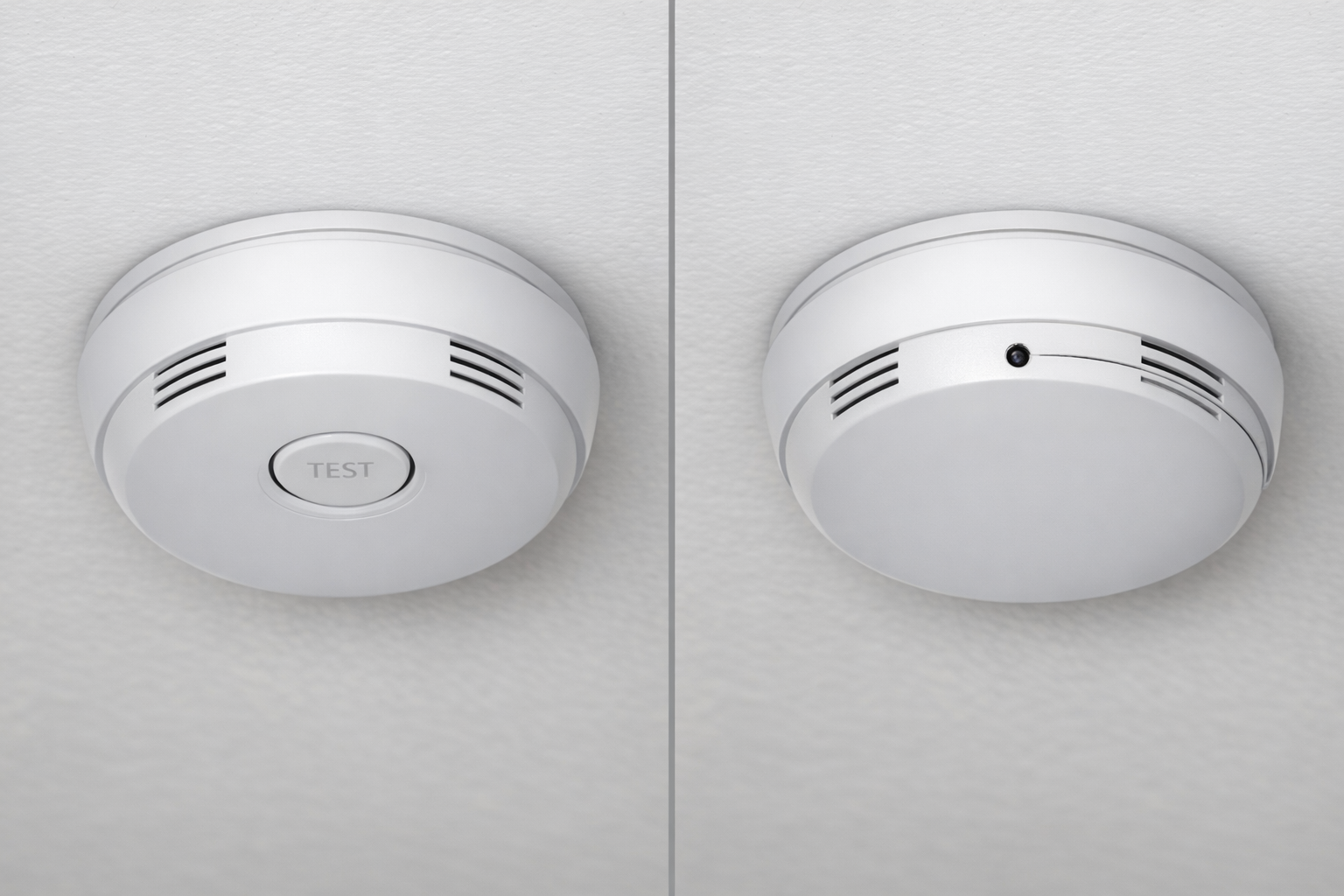
What normal usually looks like
- Even vent slots distributed around the housing
- A clearly placed test/hush button
- No glassy pinhole aimed downward
- Uniform plastic tone and screw alignment
What suspicious often looks like
- Tiny lens-like dot where no sensor should be
- Off-center opening that seems designed for viewing angle
- One detector model that does not match others nearby
- Casing seams that look pried open or re-sealed
A single clue is not proof. Multiple clues in one fixture are your decision trigger.
3) Safe Physical Inspection Workflow
Do not remove the detector unless you are authorized and safe to do so. Use non-destructive checks first:
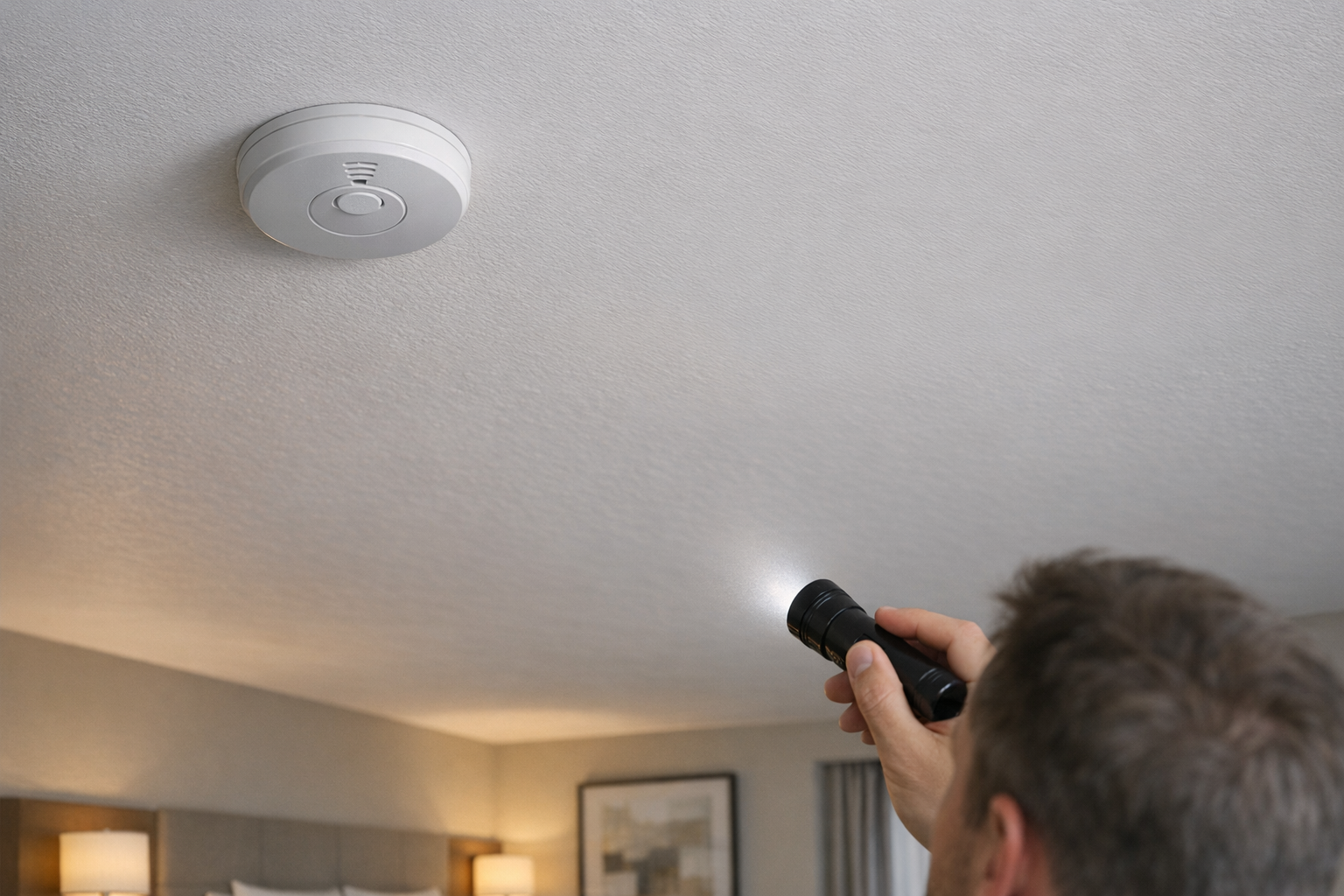
- Use your phone zoom and flashlight from below.
- Scan edges for pry marks, glue, or uneven fit.
- Compare against another detector in hallway/common area if possible.
- Check whether the detector location makes safety sense or only camera sense.
A true alarm is usually mounted for smoke coverage, not for direct surveillance angle. If the placement strongly favors viewing private zones, treat that as a high-weight signal.
4) Phone-Based Checks (Reflection, IR, and Network Sanity)
Phone checks are useful for fast triage and should be combined, not used alone.
Flashlight reflection pass
Darken the room, hold your light near eye level, and sweep slowly across the detector face. Camera lenses often bounce back a sharp, repeatable glint.
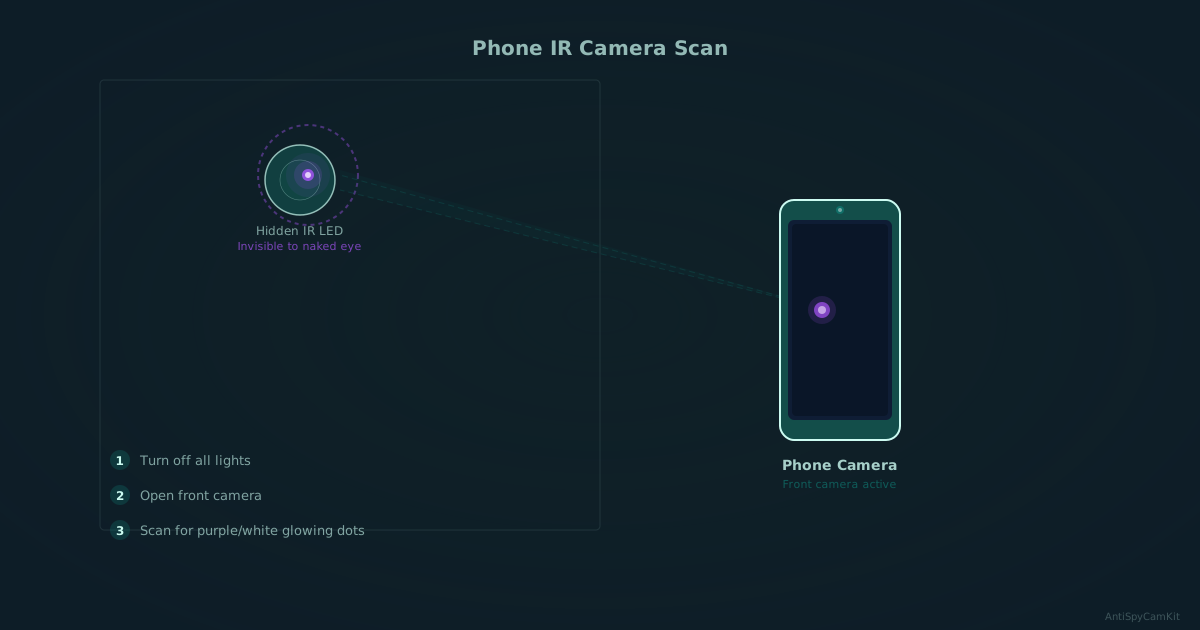
IR check in low light
Some hidden cameras use night-vision IR. In the dark, scan with your phone camera and look for faint white or purple dots that are invisible to your eyes.
Network sanity check
If you can access local Wi-Fi, run a quick device scan and note unknown camera-like device names. This does not prove a detector is clean, but it can add supporting context.
For the full workflow, use our phone detection guide.
5) When to Use a Detector (Escalation Logic)
Escalate to dedicated hardware if:
- You found repeated visual anomalies on the same fixture.
- You are in a high-risk context (rental, short stay, vulnerable travel).
- Phone checks are inconclusive but concern remains high.
Lens-first tools look for the camera lens itself, so they can help with wired setups that RF-only scans may miss. No detector proves a fixture is clean. For a complete buying breakdown, see Best Hidden Camera Detectors (2026).
If doubt remains, add a lens finder to your check.

SpyFinder Pro
Lens-first pick
Best when you want high-confidence lens detection in smoke detectors and other fixed fixtures.
- Lens-first detection
- Does not need a wireless signal
- Simple travel workflow

JMDHKK K18+
Best value mixed-method pick
Good entry option if you want RF, lens, and magnetic checks in one travel-friendly device.
- RF + lens + magnetic
- Good starter upgrade from phone-only checks
- Balanced value
If you want the full intake protocol before buying tools, run the hotel room sweep guide.
6) What to Do If a Smoke Detector Looks Suspicious
- Do not tamper with or remove the fixture.
- Photograph it in place from multiple angles.
- Capture context shots showing what area it faces.
- Move to a safer location if needed.
- Report through property management/platform and local authorities.
Your goal is clean evidence and safe escalation, not on-site confrontation.
7) FAQ
Use the FAQ section below for direct answers to common edge cases, including phone reliability, duplicate detectors, and escalation thresholds.
Bottom Line
The best way to tell if a smoke detector has a camera is a layered check: fast visual triage, safe close inspection, then phone-based verification. A single odd detail is often harmless. Take it seriously when several clues line up on the same fixture.
If your result is still uncertain, add a lens-first detector to your check, then validate against our best detector picks and the phone-first workflow for repeatable checks on every stay.
Get the free checklist
Printable hidden camera detection checklist + gear deals. Free, no spam.
Free updates. Unsubscribe anytime.
Frequently Asked Questions
What does a smoke detector camera look like?
Can I use my phone to check a smoke detector for a camera?
Are two smoke detectors in one small room suspicious?
Should I remove a suspicious smoke detector myself?
When should I use a dedicated detector tool?
What to Do Next
Related Guides

How to Find Hidden Cameras with iPhone and Android (2026)
Use your iPhone or Android to detect hidden cameras with built-in tools. Step-by-step: flashlight sweep, IR check, WiFi scan, and when to upgrade to gear.
Read guide
Find Hidden Cameras with Wi-Fi Scanning - Free Phone Method
Your phone finds Wi-Fi-connected cameras in minutes. Use Fing to scan the network, spot unknown devices, and flag camera MAC addresses — free step-by-step.
Read guide
How to Detect Hidden Cameras in Changing Rooms (2026)
How to check changing room cameras in fitting rooms & bathrooms using a 5-minute sweep, phone-first checks, and legal-safe evidence steps if you find one.
Read guide